Creating pixel art on Wplace is exciting but it can also be challenging without the right support. That’s where Wplace tools come in to make your creative journey smoother.
For beginners these tools provide guidance and accuracy, helping you place each pixel with confidence. For experienced players, they unlock new levels of precision and speed while working on massive projects.
From template overlays to advanced coordinate systems, Wplace tools give you the control you need to build detailed designs and collaborate effectively with the community.
In this guide, we’ll highlight the essential Wplace tools every creative artist and player should explore to maximize their creativity and impact on the Wplace canvas.
Complete Wplace Tool Suite
Every Wplace tool is designed to tackle specific challenges that players face on Wplace Live. These tools range from online utilities and Tampermonkey scripts to powerful browser extensions, each offering features that improve accuracy, speed, and creativity. Together they enhance your overall Wplace experience and make pixel art more enjoyable and efficient.
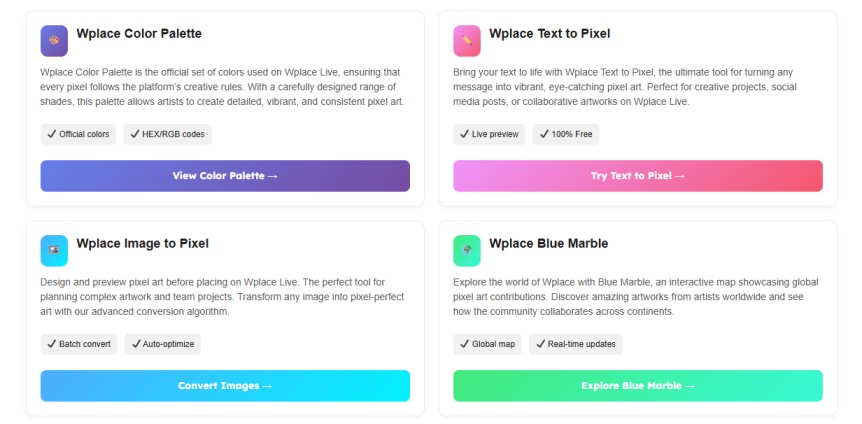
Wplace Color Palette
Wplace Color Palette is the official set of colors used on Wplace Live, ensuring that every pixel follows the platform’s creative rules. With a carefully designed range of shades, this palette allows artists to create detailed, vibrant, and consistent pixel art.
Wplace Text to Pixel
Bring your text to life with Wplace Text to Pixel, the ultimate tool for turning any message into vibrant, eye-catching pixel art. Perfect for creative projects, social media posts, or collaborative artworks on Wplace Live.
Wplace Image to Pixel
Design and preview pixel art before placing on Wplace Live. The perfect tool for planning complex artwork and team projects. Transform any image into pixel-perfect art with our advanced conversion algorithm.
Wplace Blue Marble
Explore the world of Wplace with Blue Marble, an interactive map showcasing global pixel art contributions. Discover amazing artworks from artists worldwide and see how the community collaborates across continents.
Wplace Tool FAQ
Everything You Need to Know to Master Wplace Live
What is Wplace Tool?
Wplace Tool is a powerful utility for enhancing your Wplace Live experience. It offers advanced features like template overlays, pixel-perfect placement, and drawing assistance to help you create detailed pixel art with precision.
Is it free to use?
Yes! Wplace Tool is completely free for all users, making it accessible for both beginners and experienced artists.
Do I need to install anything?
Wplace Tool works as a userscript, so you’ll need a compatible browser extension like Tampermonkey or Greasemonkey to run it. No complex installations are required.
How does the color converter work?
The color converter helps you match and adjust colors perfectly for your pixel art. Simply select your desired color, and Wplace Tool will convert it into the closest available pixel color on the canvas.
What browsers support Wplace Tool?
Wplace Tool works on most modern browsers, including Chrome, Firefox, Edge, and Opera, as long as they support userscripts.
Does Wplace Tool work in real-time?
Yes! Changes you make using Wplace Tool are reflected on Wplace Live in real-time, helping you coordinate with others efficiently.
What if the color I want isn’t available on Wplace Live?
The color converter automatically maps unavailable colors to the closest match in Wplace Live’s palette, ensuring your artwork stays accurate.
Is Wplace Tool safe to use?
Yes, Wplace Tool is a safe userscript with no malicious code. Just make sure you download it from the official source.