Let’s break it down simply. The Wplace app is essentially a giant online canvas where you and millions of other people can place colored pixels to create artwork together. Think of it as the world’s biggest collaborative art project, happening right now, in real-time.
You’re not creating art in isolation here Every pixel you place sits alongside contributions from people in Tokyo, New York, Mumbai, London, and everywhere in between.
Someone might be drawing their country’s flag while you’re recreating your favorite meme Another person might be working on a massive portrait while someone else just wants to leave their mark with a simple smiley face.
The beauty of the Wplace app? Everyone’s creation matters. Whether you’re a professional digital artist or someone who just discovered what a pixel is five minutes ago, you have the same power: one pixel at a time.
You can access the Wplace app through wplace.live on any device – your computer, phone, or tablet. No fancy equipment needed, just your creativity and an internet connection.
How Does the Wplace App Work?
Don’t worry – you don’t need a degree in computer science to use the Wplace app. Here’s how it works in plain English.
Placing Your Pixels
When you open the Wplace app, you’ll see a massive canvas (we’re talking potentially trillions of pixels here). You pick a spot, choose a color from the palette, and click to place your pixel. Easy, right?
But here’s the catch – you can’t spam pixels everywhere. After placing one, you’ll hit a cooldown timer. This might seem annoying at first, but it’s actually brilliant. It keeps things fair, prevents bots from ruining everything, and makes you think strategically about where each pixel goes.
The Infinite Canvas Experience
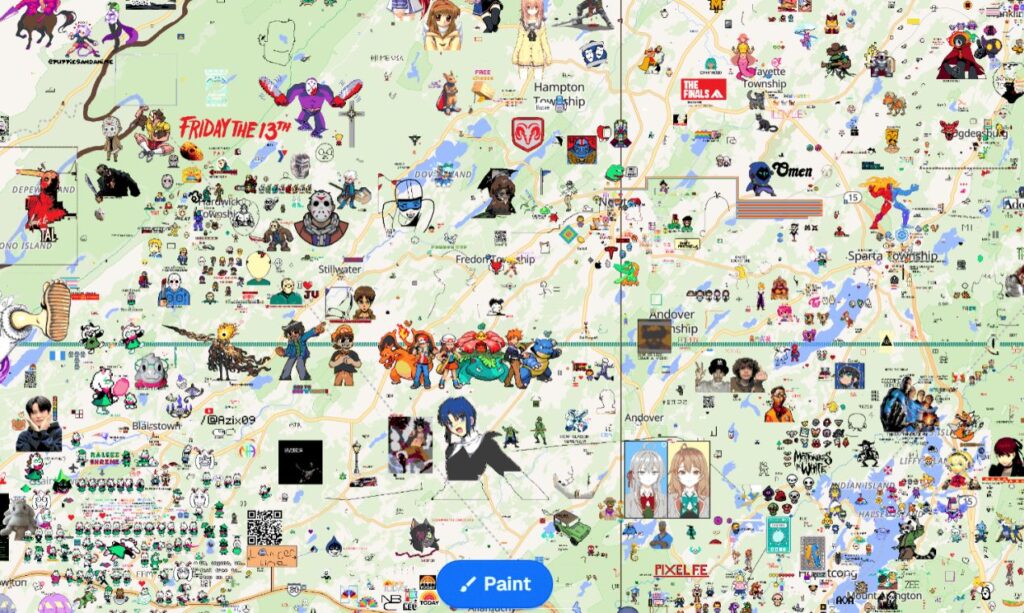
The Wplace app canvas is massive. You can zoom way out to see huge community projects spanning thousands of pixels, or zoom way in to do detailed work on intricate designs. It’s like having Google Maps, but for art.
Teamwork Makes the Dream Work
Sure, you can go solo and place pixels wherever you want. But the real fun of the Wplace app starts when you join a team. Communities form around big projects – maybe recreating the Starry Night painting, or building a giant Among Us character, or defending their corner of the canvas from rival groups.
Watch It All Happen Live
One of the coolest parts? You can literally watch the Wplace app canvas evolve in real-time. Pixels pop up constantly as users around the world add their contributions. It’s mesmerizing – sometimes you’ll just sit there watching areas transform from blank space into elaborate artwork.
What Makes the Wplace App Special?
🌎 A Canvas That Never Ends
Unlike most art apps where you’re limited to a small canvas, the Wplace app offers seemingly endless space. There’s always room for your next idea, whether it’s a tiny signature or an enormous collaborative mural.
🎨 Express Yourself Freely
The color palette in the Wplace app is carefully chosen to let you create vibrant, detailed artwork. Draw portraits, recreate famous paintings, design logos, write messages to the world, or join others in building pop culture references. The only limit is your imagination (and that cooldown timer).
⚡ Real-Time Magic
There’s something genuinely thrilling about the Wplace app’s real-time nature. You place a pixel, and boom – it’s instantly there for everyone to see. You might be working on a project and suddenly notice someone else adding pixels nearby, either helping you or starting something of their own.
👥 Find Your Tribe
The Wplace app isn’t just about pixels – it’s about people. Join Discord servers, hop into Reddit communities, or connect with teams directly in the app. Plan massive projects together, protect your art from griefing (yes, pixel wars are real), and make friends from around the world.
💎 Powerful Community Tools
The Wplace app community has developed some incredible tools. There’s the Blue Marble overlay for precision work, coordinate systems so teams can organize efficiently, color converters, template generators – basically everything you need to go from idea to pixel-perfect execution.
📱 Paint Anywhere, Anytime
Whether you’re on your laptop during lunch break, on your phone while commuting, or on your tablet while relaxing on the couch, the Wplace app works smoothly across all devices. The browser-based platform means you can jump in whenever inspiration strikes.
Getting Started with the Wplace App: Step-by-Step
Ready to place your first pixel? Here’s exactly what to do:
Step 1: Visit wplace.live – Open your browser and head to the Wplace app website. You can also download the dedicated app if it’s available for your device.
Step 2: Create Your Account – Sign up using Google, Discord, or whatever authentication method you prefer. This only takes a minute.
Step 3: Explore the Canvas – Don’t just dive in randomly! Zoom around the Wplace app canvas. See what others are creating. Look for blank spaces, or find a community project that resonates with you.
Step 4: Place Your First Pixel – Pick a color from the palette and click on the canvas. Congratulations! You’ve just added to a global artwork. How does it feel?
Step 5: Join the Community – This is where the Wplace app really comes alive. Find Discord servers or Reddit groups dedicated to Wplace. Ask questions, join projects, and connect with fellow pixel artists.
Step 6: Be Patient – See that cooldown timer? Use it wisely. While waiting to place your next pixel, scout the canvas for your next move or help plan strategy with your team.
Pro Tips for Wplace App Success
Want to make a real impact on the canvas? Here’s what experienced users wish they’d known from day one:
Use Overlay Tools: Extensions like Blue Marble are game-changers for the Wplace app. They help you place pixels with precision, especially when working on complex designs or contributing to team projects.
Find Your Team: Working solo is fine, but joining an organized group multiplies your impact. Teams use templates and coordinate efforts efficiently. Find a project you’re passionate about and jump in.
Respect the Canvas: Random vandalism isn’t creative or funny – it just ruins others’ hard work. The Wplace app thrives when we build rather than destroy. If you want to create in an occupied area, reach out to the existing community. You’d be surprised how often they’ll collaborate or help you find better space.
Start Small, Think Big: Don’t let ambitious ideas intimidate you. Every massive project on the Wplace app started with a single pixel. Break your vision into manageable chunks and work systematically.
Make Your Cooldown Count: Waiting to place another pixel? Don’t just stare at the timer. Use that time to scout new locations, refine your design, or coordinate with teammates. Efficient use of downtime separates casual users from Wplace app masters.
Take Screenshots: The canvas constantly evolves. Your artwork might get incorporated into something larger, or a pixel war might transform the entire region. Document your contributions – they tell your Wplace app story.
Learn the Hot Zones: Some areas of the Wplace app canvas see constant activity, while others remain relatively quiet. Understanding the geography helps you decide where to build based on whether you want high visibility or peaceful creation.
Playing Fair: Wplace App Rules Everyone Should Follow
The Wplace app stays fun and welcoming when everyone follows some basic guidelines:
Keep It Appropriate: The Wplace app welcomes users of all ages from around the world. Keep your artwork family-friendly. No NSFW content, period.
No Hate, Ever: Hate symbols, offensive imagery, and harassment have absolutely no place on the canvas or in the community. The Wplace app is about bringing people together, not tearing them apart.
Play By The Rules: Don’t use bots or scripts to bypass cooldowns. The timer exists for fairness – everyone should have equal opportunity to contribute. Automation ruins the spirit of what makes the Wplace app special.
Build, Don’t Just Destroy: Friendly pixel wars between willing communities can be entertaining. But wholesale destruction of others’ work isn’t collaboration – it’s just mean. If you want to take over space, at least create something better than what was there.
Communicate: Most conflicts on the Wplace app happen because of misunderstandings. If you’re planning something near someone else’s work, reach out. You’ll find most people are happy to collaborate or compromise.
Complete Wplace App Tool Suite
The Wplace app community has developed an impressive arsenal of tools that transform casual pixel placement into professional-grade collaborative art.
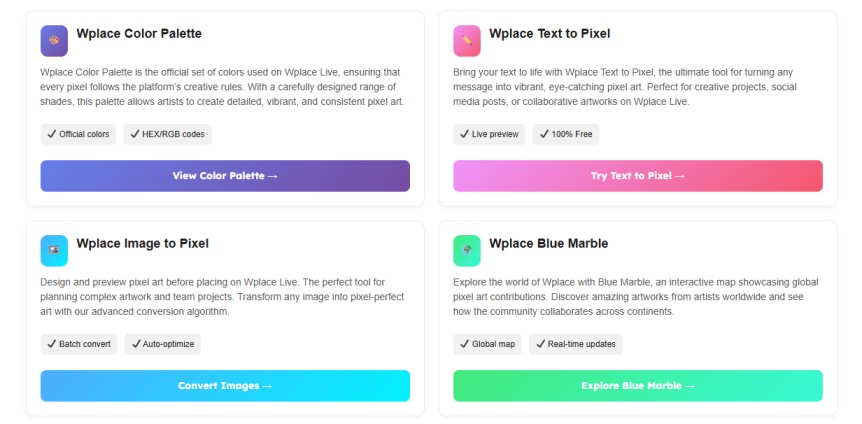
Wplace Color Palette
Wplace Color Palette is the official set of colors used on Wplace Live, ensuring that every pixel follows the platform’s creative rules. With a carefully designed range of shades, this palette allows artists to create detailed, vibrant, and consistent pixel art.
Wplace Text to Pixel
Bring your text to life with Wplace Text to Pixel, the ultimate tool for turning any message into vibrant, eye-catching pixel art. Perfect for creative projects, social media posts, or collaborative artworks on Wplace Live.
Wplace Image to Pixel
Design and preview pixel art before placing on Wplace Live. The perfect tool for planning complex artwork and team projects. Transform any image into pixel-perfect art with our advanced conversion algorithm.
Wplace Blue Marble
Explore the world of Wplace with Blue Marble, an interactive map showcasing global pixel art contributions. Discover amazing artworks from artists worldwide and see how the community collaborates across continents.
Frequently Asked Questions About the Wplace App
Is the Wplace app free to use?
Yes! Anyone can create an account and start placing pixels without paying anything.
How long do I have to wait between pixels?
The cooldown timer varies but typically ranges from a few seconds to a few minutes, ensuring fair play for all users.
Can I use the Wplace app on my phone?
Absolutely! The Wplace app works on desktop, mobile, and tablet browsers.
What if someone destroys my artwork?
Join a community! Teams can work together to maintain and defend artwork. Plus, most users respect others’ creations.
Do I need artistic skills to use the Wplace app?
Not at all! Some users create complex art, others just place a few pixels for fun. Everyone’s welcome.